
About
Over the years, the Fly Delta App has evolved into the airline's main self-service platform, allowing users to handle their travel needs without calling support, waiting in line, or navigating to a website.
Fly Delta 6.0 release was the most comprehensive update to the app in years, introducing a modernized visual system, packed with improvements designed to save time, improve clarity, simplify flows and unlock new ways to explore and manage travel even when the unexpected happens.
7Mi+ Ratings
App Store & Play Store
" height="34px" id="GLfB66OEb" width="28px"/></svg>)
" height="29.617252081524118px" id="iLEsj9LyN" transform="translate(2.981 2.236)" width="31.03756722905779px"/><path d="M 14.568 0.691 C 14.867 -0.23 16.17 -0.23 16.47 0.691 L 19.448 9.856 C 19.582 10.268 19.966 10.547 20.399 10.547 L 30.036 10.547 C 31.004 10.547 31.407 11.787 30.623 12.356 L 22.827 18.021 C 22.477 18.275 22.33 18.727 22.464 19.139 L 25.442 28.304 C 25.741 29.225 24.687 29.991 23.903 29.422 L 16.107 23.757 C 15.756 23.503 15.281 23.503 14.931 23.757 L 7.135 29.422 C 6.351 29.991 5.296 29.225 5.596 28.304 L 8.574 19.139 C 8.708 18.727 8.561 18.275 8.21 18.021 L 0.414 12.356 C -0.37 11.787 0.033 10.547 1.002 10.547 L 10.639 10.547 C 11.072 10.547 11.456 10.268 11.59 9.856 Z" fill="rgb(17, 17, 17)" height="29.617252081524118px" id="YklSWOeLX" transform="translate(39.981 2.236)" width="31.03757912092891px"/><path d="M 14.568 0.691 C 14.867 -0.23 16.17 -0.23 16.47 0.691 L 19.448 9.856 C 19.582 10.268 19.966 10.547 20.399 10.547 L 30.036 10.547 C 31.005 10.547 31.407 11.787 30.624 12.356 L 22.827 18.021 C 22.477 18.275 22.33 18.727 22.464 19.139 L 25.442 28.304 C 25.741 29.225 24.687 29.991 23.903 29.422 L 16.107 23.757 C 15.756 23.503 15.281 23.503 14.931 23.757 L 7.135 29.422 C 6.351 29.991 5.296 29.225 5.596 28.304 L 8.574 19.139 C 8.708 18.727 8.561 18.275 8.21 18.021 L 0.414 12.356 C -0.37 11.787 0.033 10.547 1.002 10.547 L 10.639 10.547 C 11.072 10.547 11.456 10.268 11.59 9.856 Z" fill="rgb(17, 17, 17)" height="29.617252081524118px" id="PO4Z0zHfT" transform="translate(76.981 2.236)" width="31.037611311345273px"/><path d="M 14.568 0.691 C 14.867 -0.23 16.171 -0.23 16.47 0.691 L 19.448 9.856 C 19.582 10.268 19.966 10.547 20.399 10.547 L 30.036 10.547 C 31.005 10.547 31.407 11.787 30.624 12.356 L 22.827 18.021 C 22.477 18.275 22.33 18.727 22.464 19.139 L 25.442 28.304 C 25.741 29.225 24.687 29.991 23.903 29.422 L 16.107 23.757 C 15.756 23.503 15.282 23.503 14.931 23.757 L 7.135 29.422 C 6.351 29.991 5.297 29.225 5.596 28.304 L 8.574 19.139 C 8.708 18.727 8.561 18.275 8.211 18.021 L 0.414 12.356 C -0.369 11.787 0.033 10.547 1.002 10.547 L 10.639 10.547 C 11.072 10.547 11.456 10.268 11.59 9.856 Z" fill="rgb(17, 17, 17)" height="29.617252081524118px" id="A90I3IwCf" transform="translate(113.981 2.236)" width="31.03764350176162px"/><path d="M 14.568 0.691 C 14.867 -0.23 16.171 -0.23 16.47 0.691 L 19.448 9.856 C 19.582 10.268 19.966 10.547 20.399 10.547 L 30.036 10.547 C 31.005 10.547 31.407 11.787 30.624 12.356 L 22.827 18.021 C 22.477 18.275 22.33 18.727 22.464 19.139 L 25.442 28.304 C 25.741 29.225 24.687 29.991 23.903 29.422 L 16.107 23.757 C 15.756 23.503 15.282 23.503 14.931 23.757 L 7.135 29.422 C 6.351 29.991 5.297 29.225 5.596 28.304 L 8.574 19.139 C 8.708 18.727 8.561 18.275 8.211 18.021 L 0.414 12.356 C -0.369 11.787 0.033 10.547 1.002 10.547 L 10.639 10.547 C 11.072 10.547 11.456 10.268 11.59 9.856 Z" fill="rgb(17, 17, 17)" height="29.617252081524118px" id="VK77orObc" transform="translate(150.981 2.236)" width="31.037643501761636px"/><path d="M 9.017 0 C 9.986 0 10.388 1.24 9.605 1.809 L 1.808 7.473 C 1.458 7.728 1.311 8.179 1.445 8.591 L 4.423 17.757 C 4.722 18.678 3.668 19.444 2.884 18.875 L 0 16.779 L 0 0 Z" fill="rgb(215, 215, 215)" height="19.070119589458677px" id="DoGJr1iQ7" transform="translate(172 12.783)" width="10.018814156058502px"/></svg>)
4.8 in App Store Ratings
Best Airline App
Forbes Travel Guide
" height="12.801519092918483px" id="JlTPlUcA1" transform="translate(14 11)" width="14.090212229409591px"/><path d="M 19.04 6.189 L 4.972 14.25 C 3.088 15.329 0.84 14.462 0 12.685 L 12.796 0 Z" fill="rgb(0, 0, 0)" height="14.723665424135149px" id="xNnMQwuYy" transform="translate(0.34 18.276)" width="19.039910632849057px"/><path d="M 12.363 12.243 L 0.014 24.483 C 0.005 24.378 0 24.271 0 24.163 L 0 0.304 C 0 0.201 0.004 0.1 0.012 0 Z" fill="rgb(0, 0, 0)" height="24.4834297815024px" id="QmaAQP8iK" transform="translate(0 5.267)" width="12.36261435353347px"/><path d="M 0 2.052 C 0.836 0.266 3.09 -0.608 4.978 0.474 L 19.059 8.541 L 12.803 14.743 Z" fill="rgb(0, 0, 0)" height="14.74264429085406px" id="PpFCmFPPH" transform="translate(0.334 2)" width="19.058725872349825px"/></svg>)
4.8 in Google Play Store Rating
A Comprehensive Re-architecture
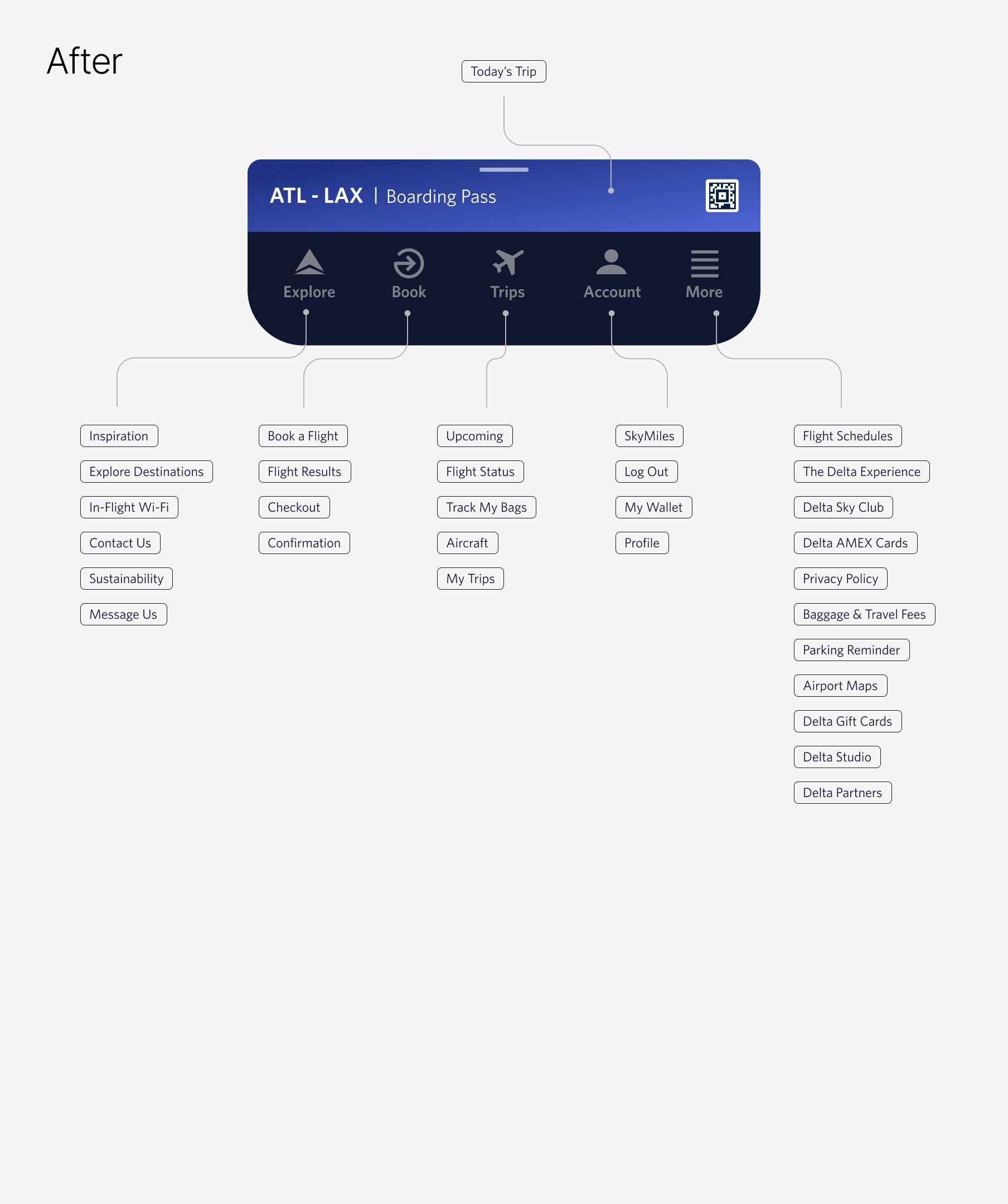
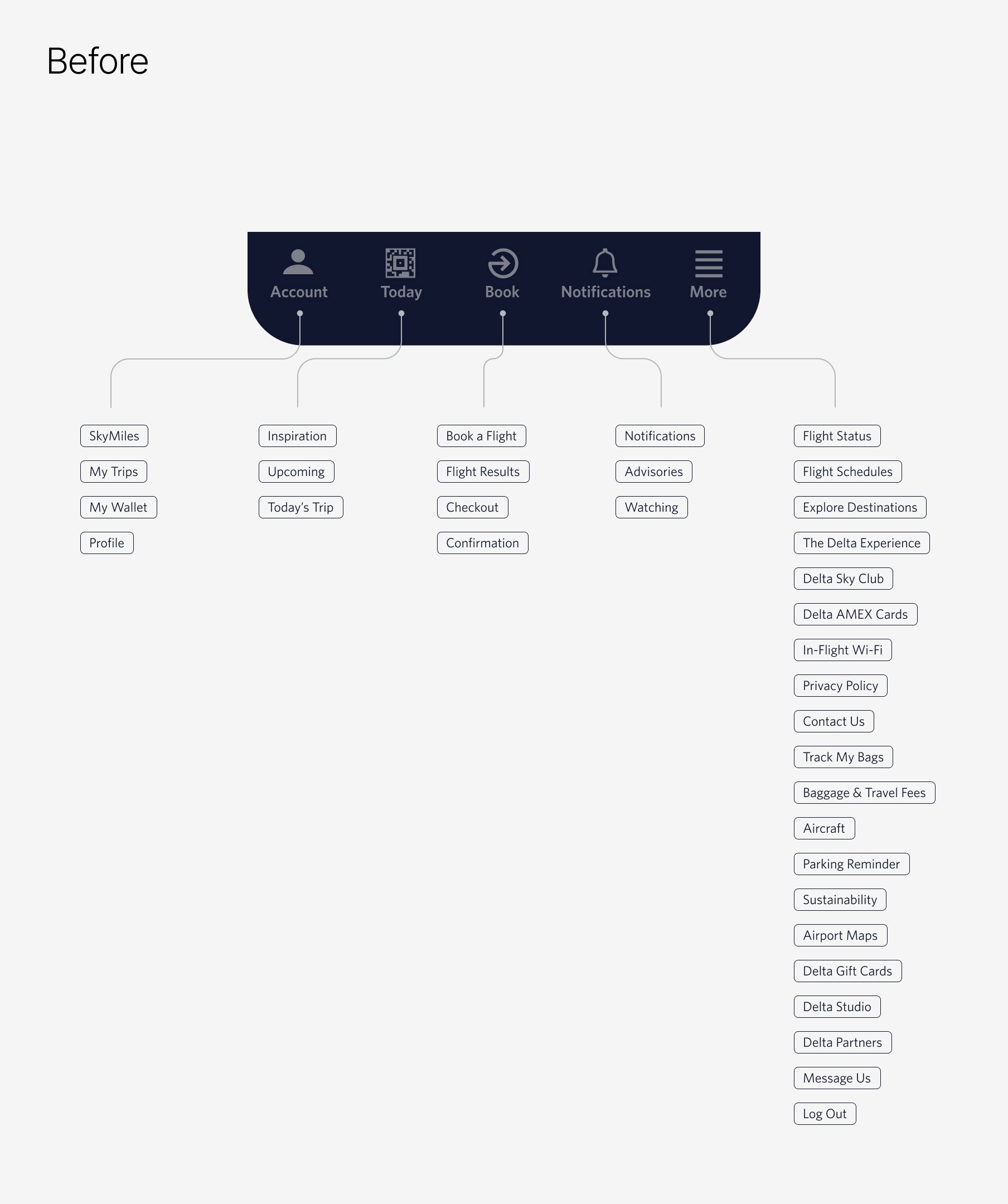
As the app expanded, its navigation fell out of sync with how customers naturally think about travel. We addressed this reimagining the navigation around key moments, elevating day-of-travel with a dynamic boarding pass, and bringing upcoming trips to the forefront. The resulting system follows a logical progression:
Inspiration → Purchase → Ownership → Account Management
This new architecture bridges the gap between curiosity and commitment, providing clear distinctions between discovery, action, and trip management.
Sticky Boarding Pass
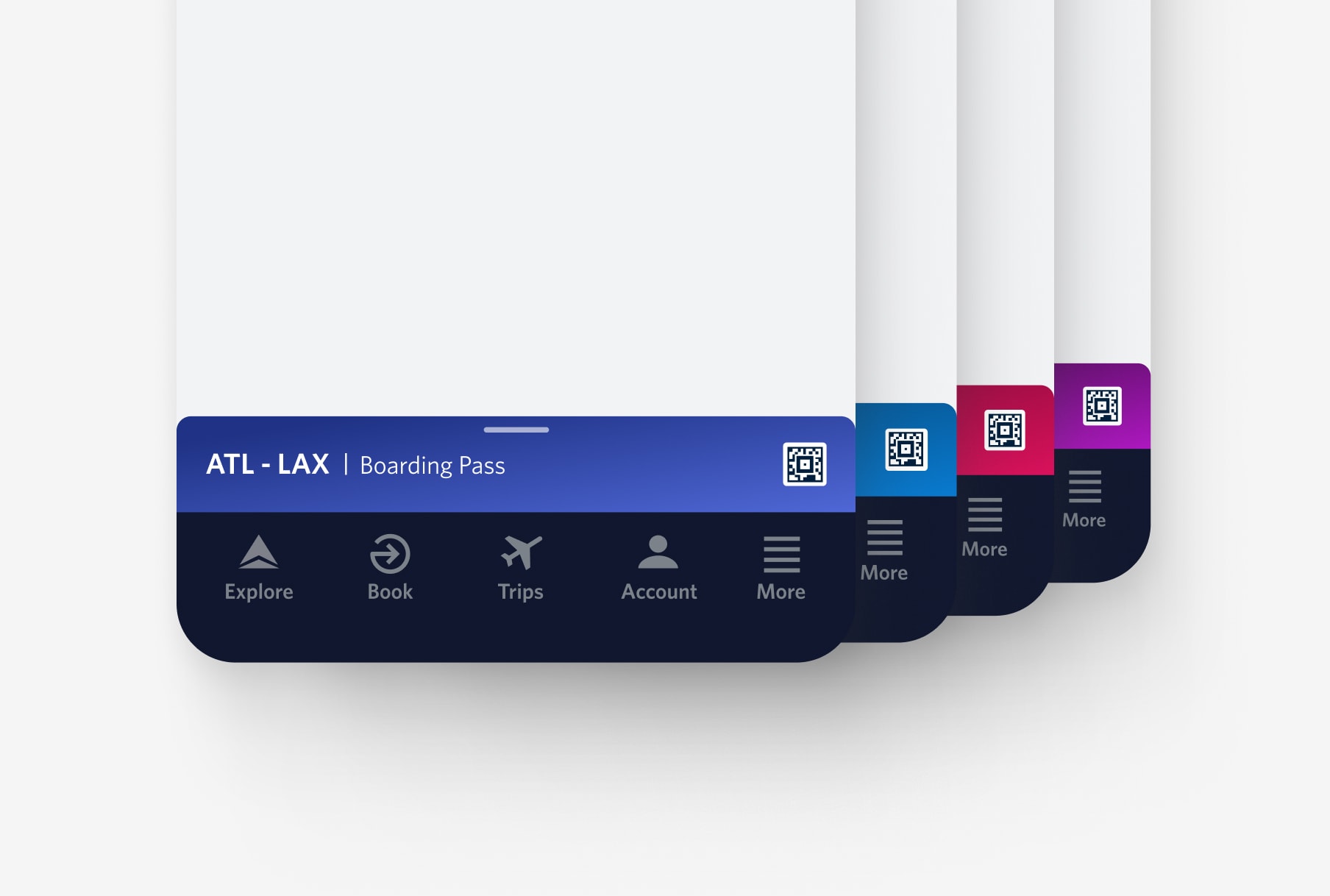
To maximize navigation efficiency, we replaced the underutilized "Today" tab with a context-aware boarding pass. On travel days, essential flight details are housed in a persistent bottom sheet that utilizes cabin-specific colors. This creates a more intuitive, visual interface that reduces friction during high-stress moments.
Explore Page
A New Home Screen for the App
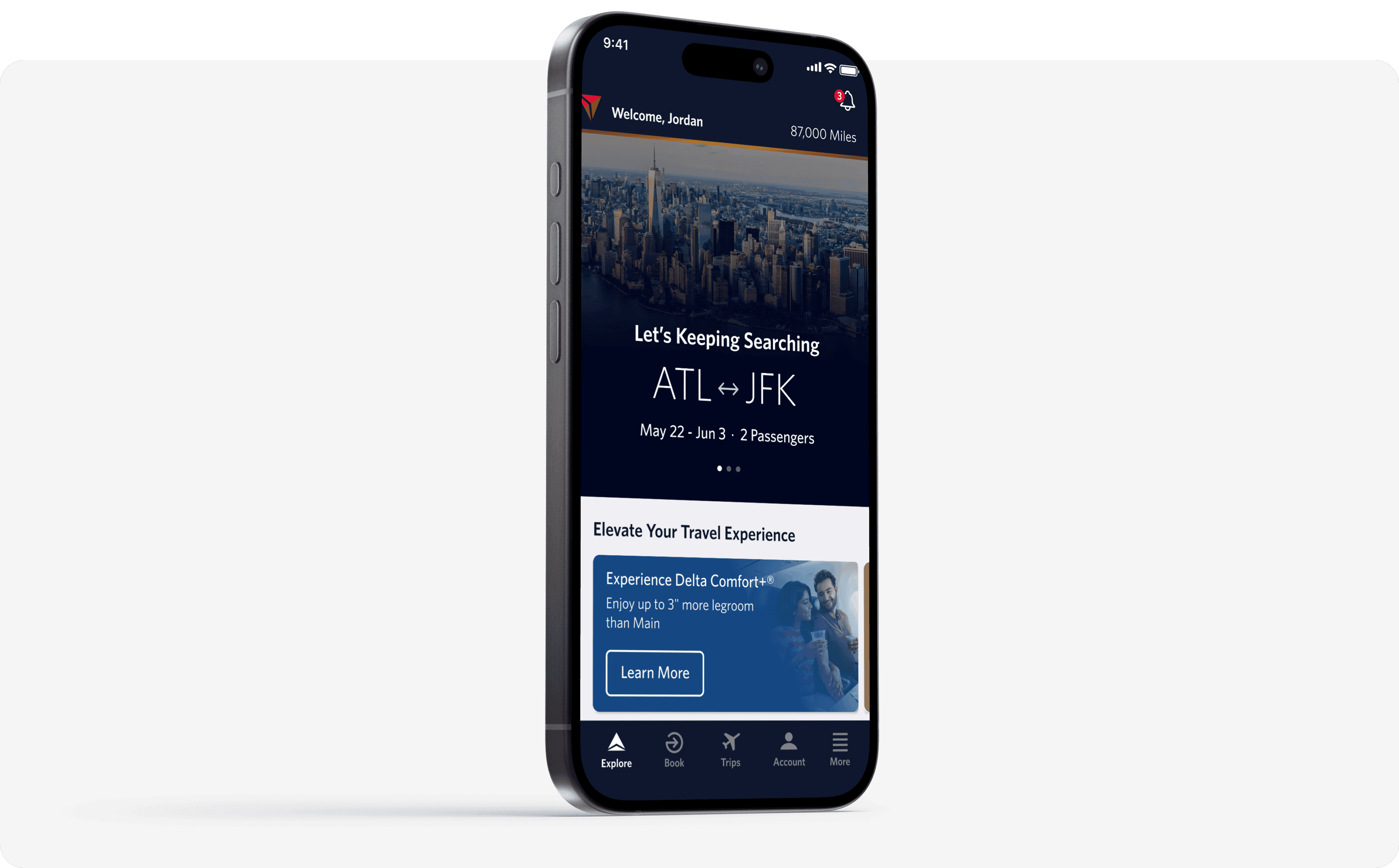
The Explore page represents a fundamental shift: Fly Delta’s first true “home screen” designed around inspiration rather than transactions.
Dynamic Contextual Content Strategy
Explore was built to serve a diverse spectrum of personas, from frequent business travelers to aspirational planners and occasional leisure flyers, while accommodating a broad range of variables and decision drivers.
The page is composed of modular zones that adapt based on customer context:
Logged-in state
Travel history
Loyalty status
Recent searches
Upcoming trips
Geographic relevance
Seasonal opportunities
This zoning system allows the page to evolve over time without structural redesign.
Anticipating User’s Needs
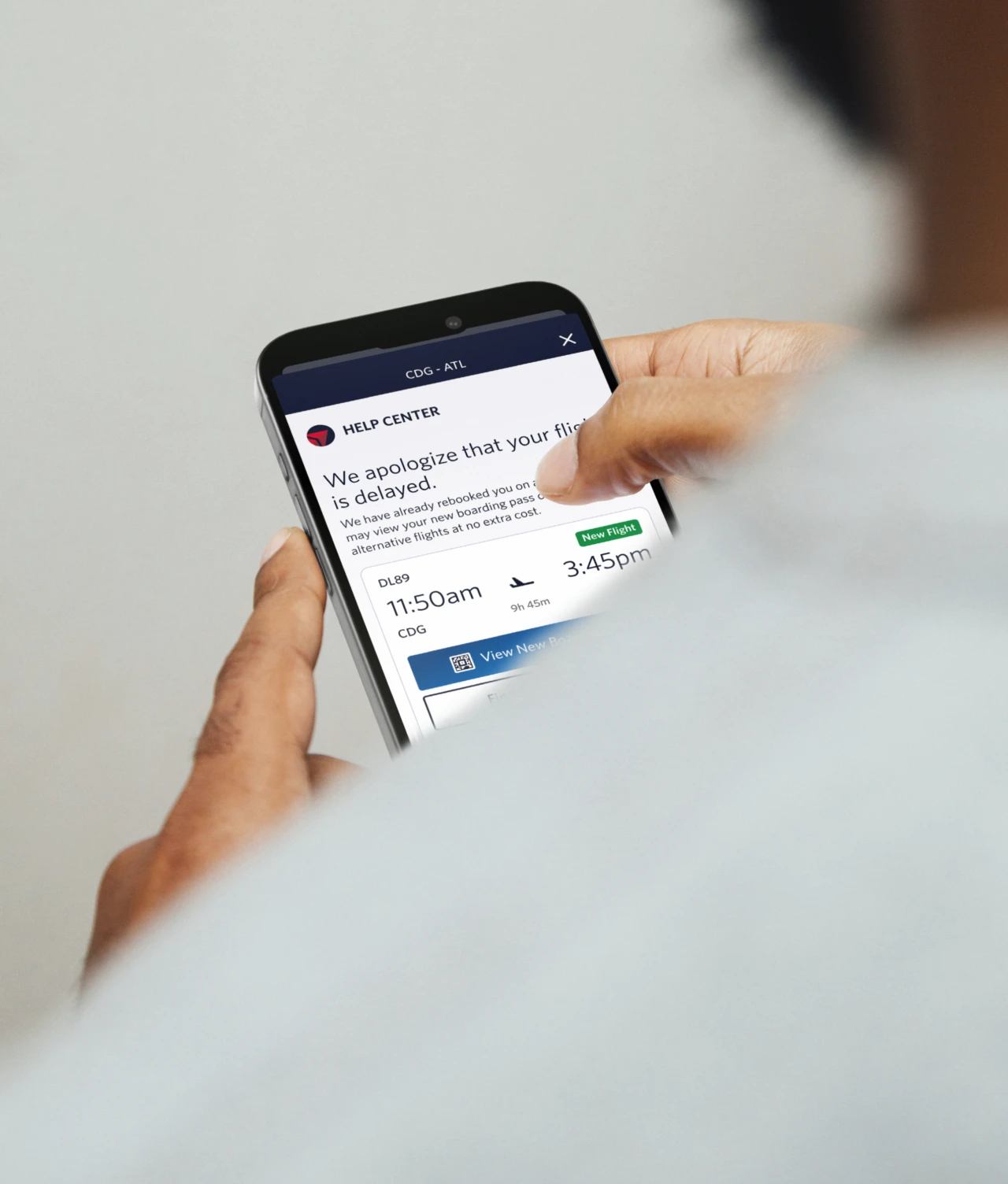
To better support customers during moments of disruption, we introduced the Help Center experience, created to simplify next steps and reduce uncertainty. Rather than forcing customers to search for answers, the experience proactively surfaces a streamlined set of actions tailored to their situation, guiding them clearly through what’s required to continue their journey.
The new Help Center consolidates critical tools into one dynamic, centralized page. Customers can manage rebooking options, track baggage, and access relevant trip details without navigating across multiple screens.
A Simpler Path to Status
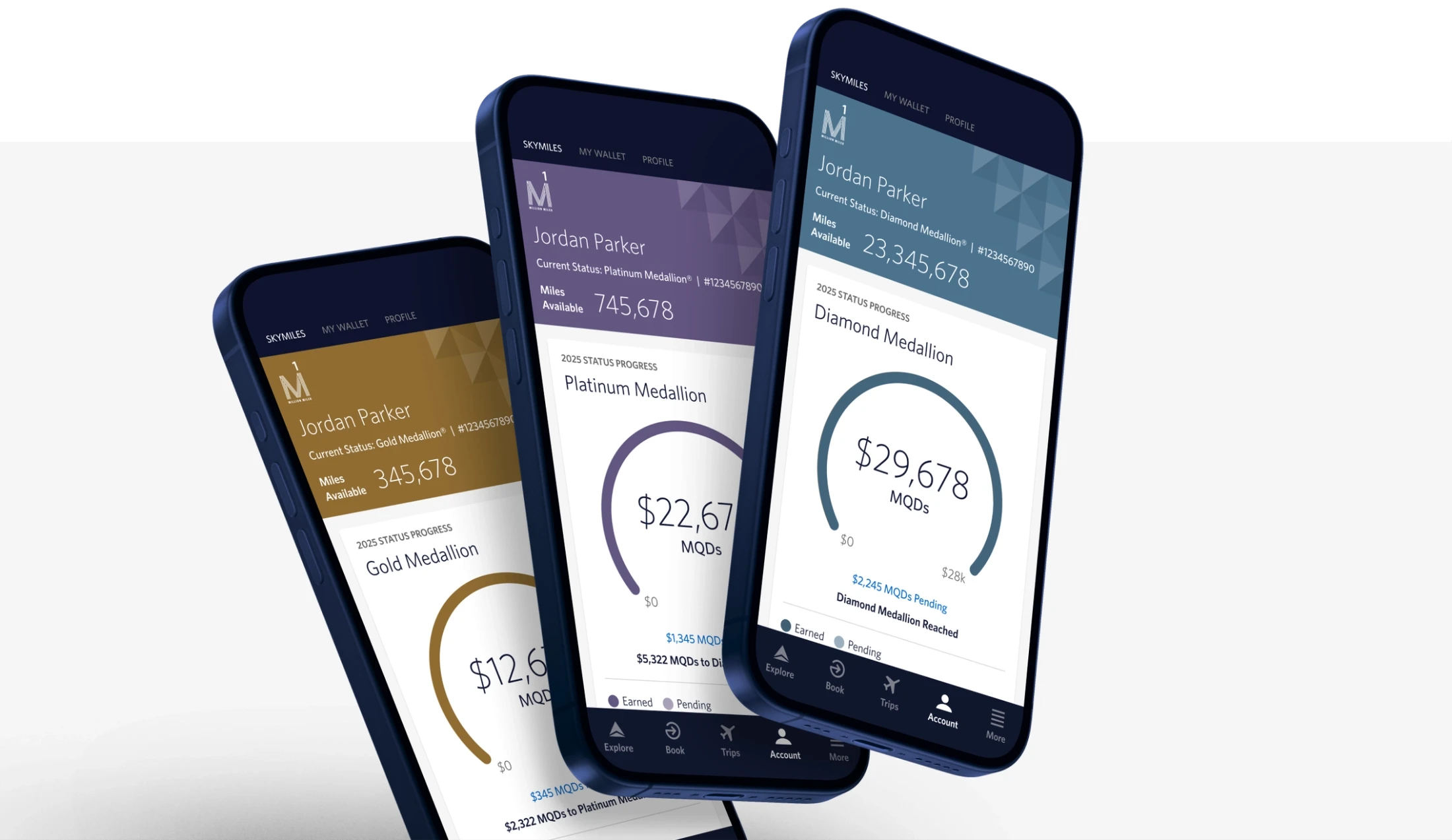
With the introduction of the simplified SkyMiles program, the loyalty experience was completely redesigned to make earning status clearer and easier to understand. Medallion Status now centers around a single qualifier: Medallion Qualification Dollars (MQDs), eliminating the complexity of multiple metrics.
The updated page brings greater visibility and transparency to members’ progress. A redesigned status tracker clearly shows how many MQDs have been earned and how far members are from the next tier, while new views make redeemable miles, lifetime miles, and earning activity easier to access and understand.
Design Team
Mike Hickman
Rob Simon
Bridged Walsh
Ben Harrison
Sydney Haddon
Anna Bitskaya
Yungji Kim